
This section will provide guidelines for fetching and providing quotation information via a custom integration.
Requirements
To integrate custom quoting in the Conversion Extension, you will need to:
- Create custom integration service that can receive a
conversion.quotewebhook event. The details for this webhook event are laid out in the Quote event section of this guide. - Add the service as an integration in the Rehive Admin Dashboard.
- Configure a
conversion.quotewebhook on the integration in the dashboard.- Ensure that you use a unique, random value as the
secret.
- Ensure that you use a unique, random value as the
- Associate the integration to any conversion pairs that should use your custom integration to fetch quotes Rehive Conversion Extension.
Steps:
- The user initiates a conversion transaction using the app.
- The Rehive Conversion extension sends a
conversion.quotewebhook to the custom integration. - The custom integration verifies the secret sent in the headers and then:
- Fetches applicable quote information (via the source of your choice).
- If needed, performs any actions needed to ensure the funds/liquidity is available.
- Returns a quote to the Rehive conversion extension in the response.
- The Conversion extension uses the webhook response data to construct a conversion that gets returned to the user for approval.
- The user approves the quote and processing proceeds to conversion execution.
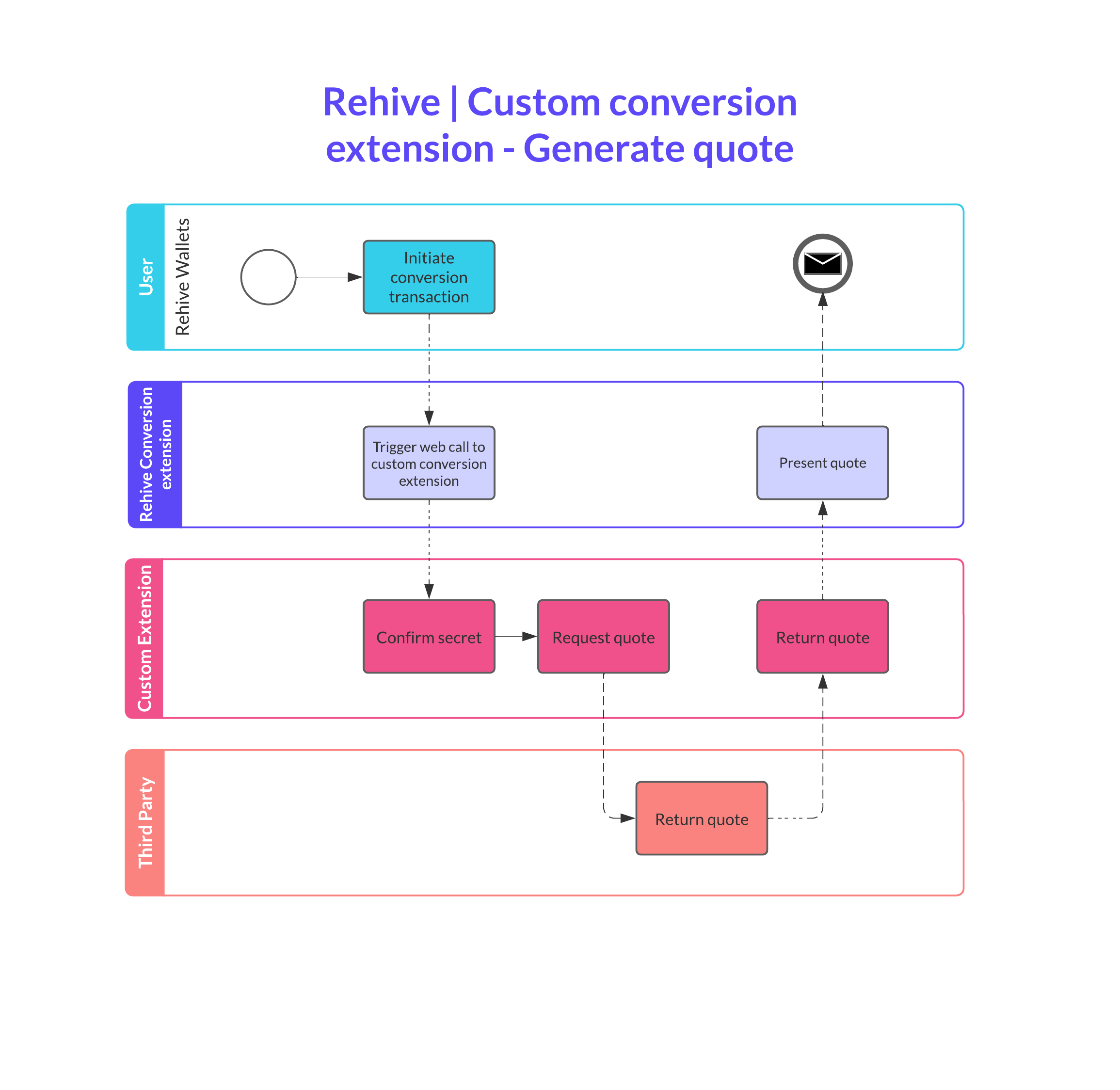
Quote event
To integrate with the Conversion Extension, the custom integration requires an endpoint that can receive conversion.quote events. This endpoint url, along with a secret, is configured when setting up webhooks on a conversion extension integration.
The conversion.quote event is sent when a user requests a quote and it provides an opportunity for your integration to modify the quote to something suitable to your needs.
Request data
The request data sent by the Conversion Extension in the conversion.quote event looks like:
{
    "id": "<conversion_id>",
    "user": "<user_id>",
    "from_currency": "<currency_code>",
    "to_currency": "<currency_code>",
    "from_amount": 1000,
    "to_amount": null,
    "debit_account": "<account_reference>",
    "credit_account": "<account_reference>",
    "transaction_collection_id": "<collection_id>",
    "metadata": null
}
| Name | Type | Description |
|---|---|---|
| id | string uuid | The conversion ID. |
| user | string uuid | The user requesting the conversion. |
| from_currency | string | The currency that will be sold by the conversion. |
| to_currency | string | The currency that wll be bought by the conversion. |
| from_amount | integer | Optional integer representation of the credited amount. |
| to_amount | integer | Optional integer representation of the credited amount. |
| debit_account | string | A reference for the account where the from_currency will be debited. |
| credit_account | string | A reference for the account where the to_currency will be credited. |
| transaction_collection_id | string uuid | The pre-generated collection ID that will be used if the quote is approved. |
| metadata | object | An optional object containing JSON metadata about the conversion. |
Either a from_amount or to_amount will be included. Your integration must be prepared to generate quotes from either direction.
Response data
Once you have verified the incoming webhook’s secret and performed any validation you can do anything else necessary to construct a quote that matches your business’s requirements.
Your response should be a 200 HTTP status with a JSON body formatted like:
{
    "from_amount": 1000,
    "to_amount": 1000,
    "from_fee": null,
    "to_fee": null,
    "expires": null,
    "rate": 0.01
}
| Name | Type | Description |
|---|---|---|
| from_amount | integer | Final integer representation of the from_currency debited amount. |
| to_amount | integer | Final integer representation of the to_currency credited amount. |
| from_fee | integer | An optional integer representation of a from_currency fee. |
| to_fee | integer | An optional integer representation of a to_currency fee. |
| expires | integer | An optional UNIX timestamp (UTC) when the quote should expire. |
| rate | float | A float percentage rate used to generate the from_amount and to_amount. |